Why AI Image Translator is Perfect for Annotated Drawings & Product Labels
In our increasingly interconnected world, the ability to quickly and accurately translate text in images has become essential across various industries. From medical illustrations and engineering schematics to multilingual product packaging, professionals need reliable tools that can handle specialized content without compromising quality.
While many generic “translate image online” solutions exist, most struggle with technical documents, annotated drawings, and product labels. These tools are typically designed for casual use—think translating restaurant menus or street signs—and often falter when confronted with:
- Small, dense text (common in technical manuals)
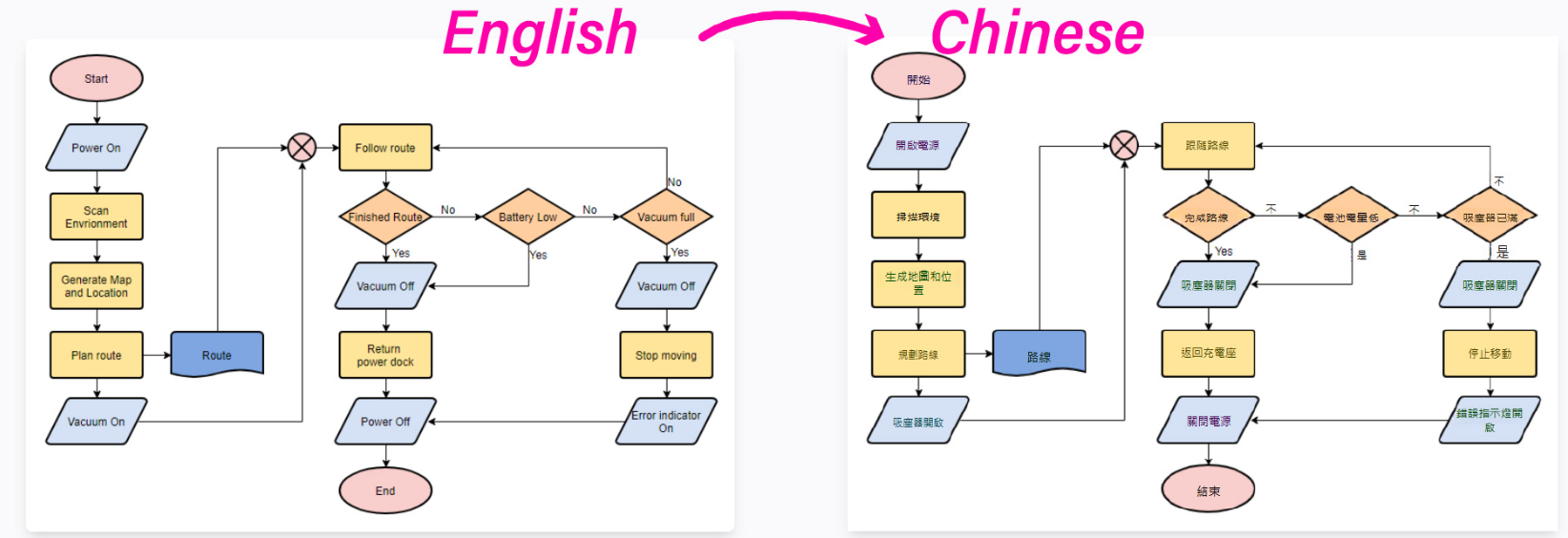
- Complex layouts (e.g., flowcharts, UML diagrams)
- Industry-specific terminology (medical, engineering, legal jargon)
This is where Intent's AI Image Translator shines. Unlike generic tools, it is optimized for digital documents with clear, machine-generated text, making it the perfect solution for:
✔ Annotated diagrams (medical, technical, educational)
✔ Product labels & packaging (food, electronics, pharmaceuticals)
✔ Technical drawings (blueprints, schematics, UML diagrams)
In this article, we’ll explore why this tool is a must-have for professionals who need fast, accurate, and layout-preserving translations.
The Unique Challenges of Translating Annotated Drawings
Why Manual Translation Falls Short
Annotated drawings—such as anatomy charts, engineering diagrams, or instructional illustrations—often contain critical labels that must be translated with precision. Traditional methods include:
- Manually retyping text (extremely time-consuming)
- Using basic OCR tools (which often misread technical terms)
- Hiring specialized translators (expensive and slow)
These approaches are inefficient and prone to errors, especially when dealing with:
- Multi-language annotations (e.g., bilingual textbooks)
- Complex layouts (arrows, callouts, numbered steps)
- Industry-specific terminology (medical Latin, engineering abbreviations)
How AI Image Translator Solves These Problems

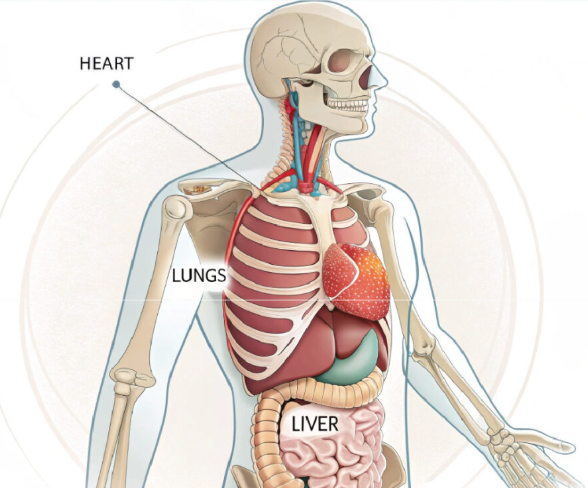 | 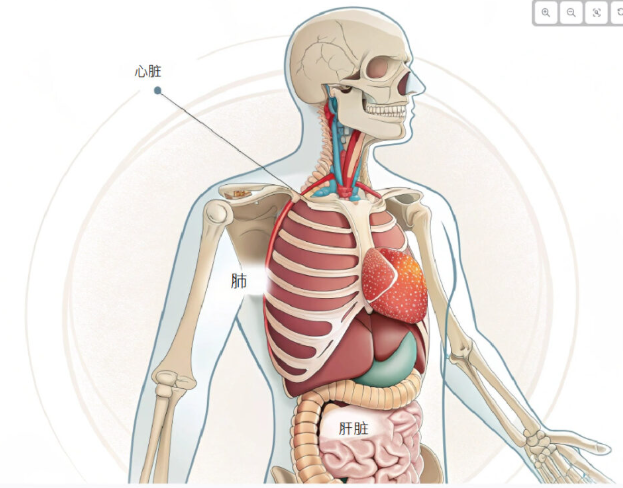 |
Intent's tool is specifically designed for structured digital content, offering:
✅ Layout Preservation – Text stays perfectly aligned with arrows, labels, and diagrams.
✅ Technical Term Accuracy – Recognizes specialized jargon (e.g., “femur” in anatomy, “resistor” in electronics).
Real-World Example: A medical researcher needs to translate an annotated human skeleton diagram from French to English. Instead of manually relabeling each bone, they upload the image to Intent's AI Image Translator, which automatically replaces the text while keeping all labels correctly positioned.
Product Labels: Why Generic Tools Aren’t Enough
The Importance of Precision in Label Translation
Whether it’s food packaging, electronics manuals, or pharmaceutical instructions, product labels must be translated:
- Accurately (to comply with international regulations)
- Consistently (to maintain brand integrity)
- Without layout distortion (to fit original packaging designs)
Generic tools like mobile photo translators often produce:
❌ Misaligned text (ruining label aesthetics)
❌ Incorrect terminology (e.g., mistranslating “gluten-free” in food labels)
❌ Poor font matching (making labels look unprofessional)
How AI Image Translator Ensures Flawless Label Localization
Intent's tool is optimized for printed and digital labels, offering:
✔ Pixel-Perfect Text Replacement – No awkward spacing or font mismatches.
✔ Industry-Specific Dictionaries – Correctly translates technical terms (e.g., “CE certification” in electronics).
✔ Multi-Language Support – Handle translations for global markets (EU, Asia, Americas).

Use Case Example: A cosmetics brand wants to expand into the Japanese market. Instead of redesigning every product label from scratch, they use Intent's AI Image Translator to convert English text into Japanese while preserving the original design.
Beyond Labels & Annotations: Other Key Use Cases
While annotated drawings and product labels are the most obvious applications, Intent's AI Image Translator is also incredibly useful for:
A. Technical Manuals & Instructional Guides
Translate assembly instructions (e.g., furniture, machinery) without disrupting numbered steps. Perfect for IKEA-style diagrams or industrial equipment manuals.
B. Educational Materials
Convert textbook illustrations for international students while preserving mathematical equations and scientific notations.
C. UI/UX Mockups
Localize app screenshots for multilingual user testing. Translate website wireframes before development. Localize technical diagrams with AI-powered translation.
How It Works: A Step-by-Step Breakdown
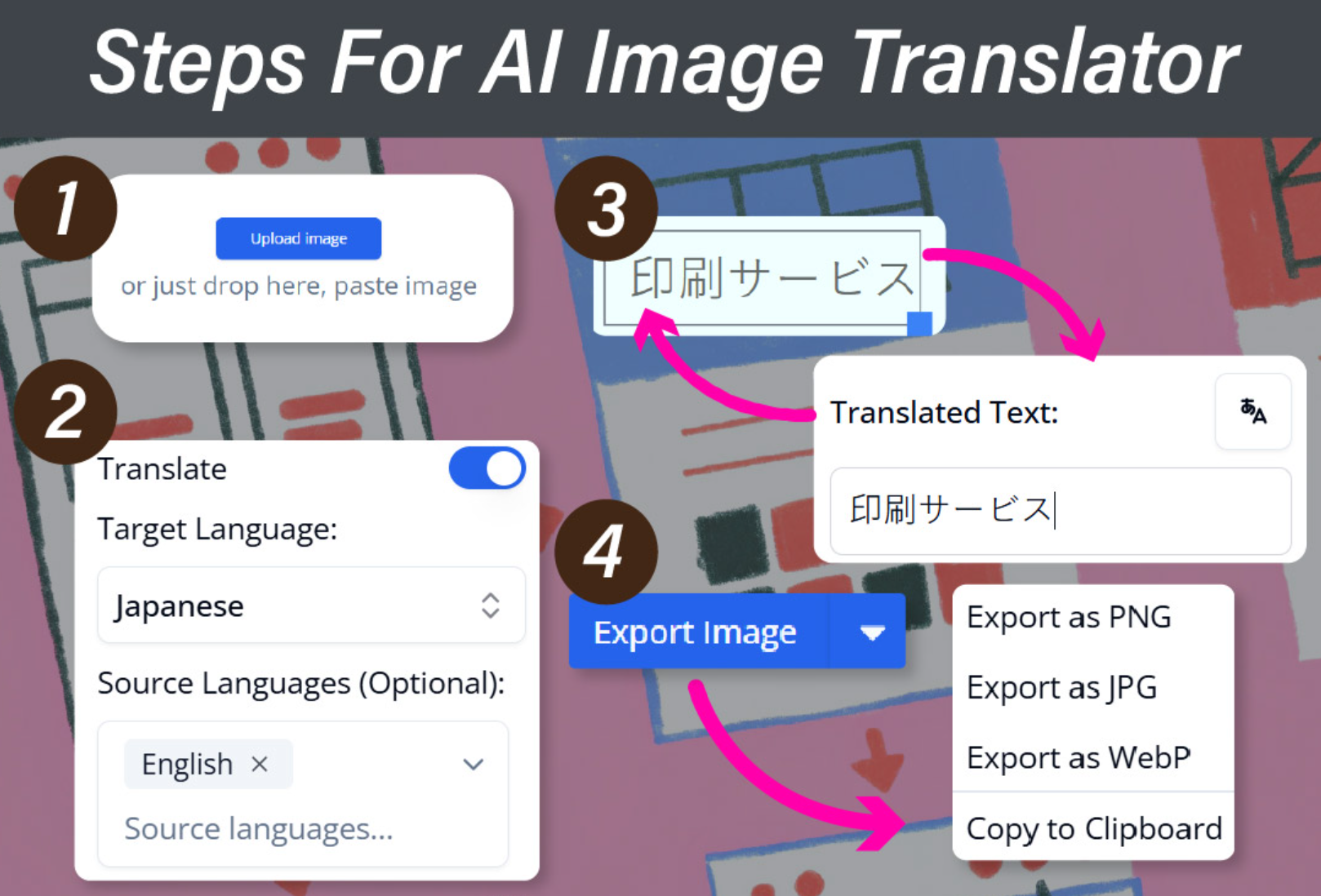
- Upload Your Image Supports PNG, JPG, SVG (ideal for digital documents). Works best with high-resolution scans (300 DPI or higher).
- Select Languages Choose from 50+ languages, including regional dialects.
- Review & Edit Adjust text placement if needed (rarely necessary). Verify technical terms for accuracy.
- Download or Integrate Export as an image or import into Intent for further editing.
Why Generic “Translate Image Online” Tools Fail
Most free tools are built for:
- Casual photos (e.g., street signs, menus)
- Handwritten notes (low accuracy)
They struggle with:
❌ Small, dense text (common in technical docs)
❌ Complex layouts (e.g., flowcharts with connectors)
❌ Non-standard fonts (e.g., stylized product logos)
Intent's AI Image Translator is optimized for digital-born text, ensuring:
✔ 98%+ accuracy for printed/digital content
Best Practices for Optimal Results
To achieve the highest translation quality:
- Use high-contrast images (dark text on light background).
- Avoid shadows/glare (clean scans work best).
- Proofread technical terms (AI may need minor tweaks).
Try It Yourself for Free
Ready to translate text in images like a pro?
Test the Intent AI Image Translator Demo! For unlimited access, upgrade to Combo Edition.
The Future of Technical Translation
As businesses and educators operate in multilingual environments, the demand for precise, automated image translation will only grow. Intent's AI Image Translator fills a critical gap—offering layout-aware, terminology-accurate translations for professionals who can’t afford errors.
Whether you’re a medical illustrator, product designer, or technical writer, this tool eliminates the headaches of manual translation while delivering studio-quality results.
Next time you need to translate an image online, skip the guesswork and let AI do the heavy lifting!