

How to Translate Korean Text in Images
Korean content is everywhere — from chart-topping K-pop album posters and viral webtoon panels to travel photos filled with Hangul shop signs and restaurant menus. Whether you are a fan trying to understand your favorite idol's latest merchandise, a webtoon reader following an untranslated series, or a traveler navigating the streets of Seoul, you need a fast and reliable way to translate Korean text in images without manual typing or copy-pasting.
AI-powered tools now make it possible to translate Korean images instantly. In this guide, we will show you exactly how to do it, covering K-pop content, webtoons, signs, and more, using Intent's free online image translator.
How to Translate Korean Text in Images Online for Free
You do not need to install software or create an account to start translating Korean text. Intent's free online image translator works directly in your browser and handles Korean Hangul with high accuracy.
Here is how it works:
- Upload your image
Drop in any image containing Korean text: a K-pop poster, webtoon screenshot, menu photo, or street sign. The tool accepts JPG, PNG, and PDF formats.
- Choose your target language
Select English, Spanish, Japanese, Chinese, or any of 100+ supported languages.
- Get your translated image
The AI detects Korean text regions, translates them, and generates a new image with translated content overlaid naturally. The original layout and artwork stay intact.
The entire process takes seconds. No downloads, no browser extensions, no credit card required. It works on desktop, tablet, and mobile, perfect for translating Korean content anywhere.
K-Pop Posters, Album Art, and Fan Content
K-pop fans constantly encounter Korean text they want to understand — album packaging, concert posters, lightstick instructions, and social media posts from their favorite idols. Waiting for fan translations or trying to decipher Hangul character by character is frustrating and slow.
With an AI Korean image translator, you can handle K-pop poster translation in seconds. Upload a photo of an album booklet, and every line of Korean lyrics, credits, and liner notes becomes readable in your language. Screenshot an idol's handwritten fan letter and translate it immediately.
This is especially useful for:
- Concert and event posters
Understand dates, venue details, and ticketing information without waiting for official English announcements.
- Album packaging
Read liner notes, special messages, and hidden credits in full.
- Social media screenshots
Translate Instagram stories, fan café posts, or Weverse updates from Korean to English instantly.
- Merchandise and lightsticks
Decode setup instructions or limited edition descriptions.
If you enjoy translating visual fan content, you might also like Intent's AI manga translator. It uses the same technology for Japanese manga and Chinese manhua panels.
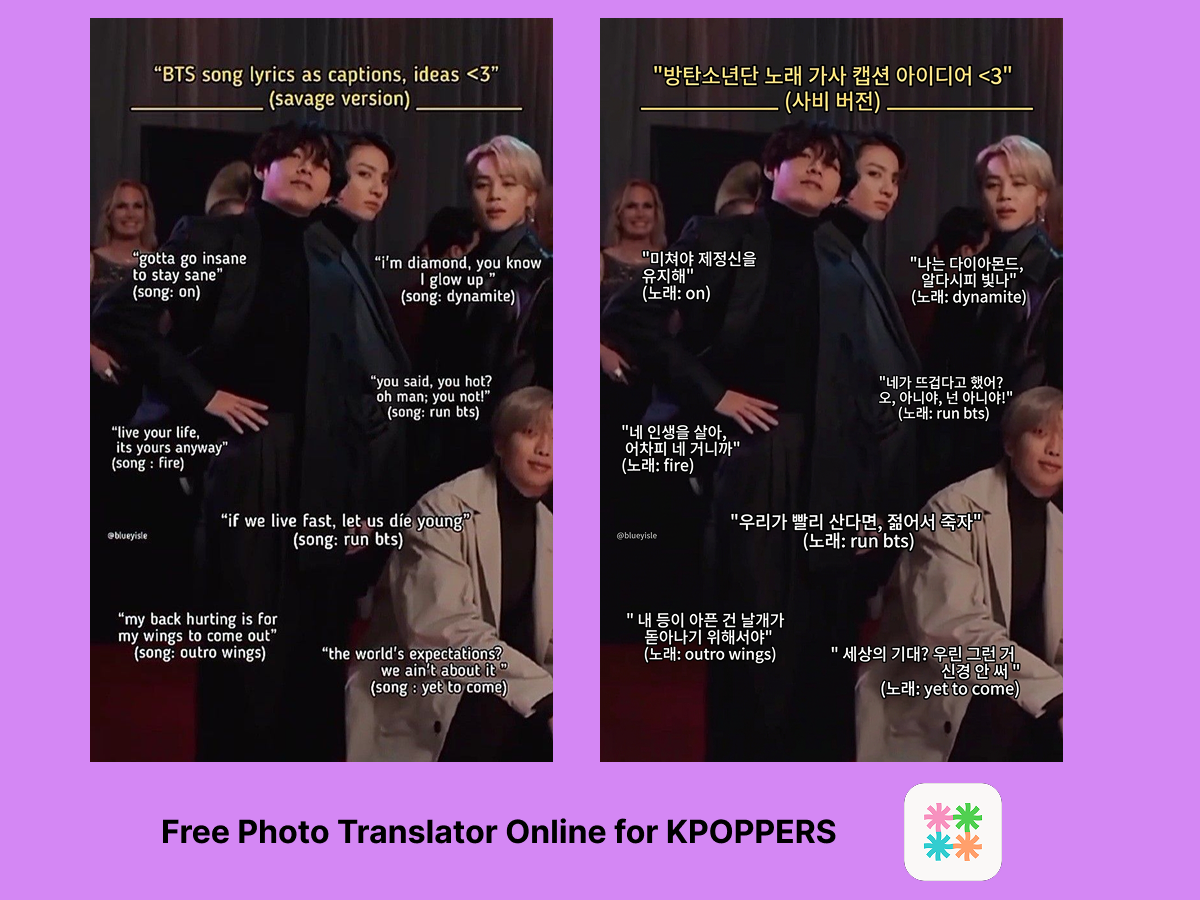
Webtoon Panels and Manhwa Pages
Korean webtoons have a massive global following, but many popular titles remain untranslated or face significant delays before official English versions appear. Fans who want to read the latest chapters of their favorite manhwa often find raw Korean panels online with no translation available.
Instead of waiting weeks or months, you can upload webtoon panels directly to an image translation tool and read them right away. The AI handles speech bubbles, narration boxes, and sound effects, translating Korean to English image content while keeping the artwork intact.
This webtoon translation tool works well for:
- Ongoing series with delayed English releases
- Completed manhwa that never received official translations
- Fan-created Korean comics shared on social platforms
- Webtoon advertisements and previews on Korean platforms like Naver and KakaoPage
Because the translator preserves the visual layout, the reading experience stays natural. Translated text appears exactly where the Korean originally was — no awkward overlays or separate text boxes.
Translating Korean Signs, Menus, and Labels While Traveling
Traveling in South Korea is exciting, but Hangul can be challenging if you do not read Korean. Restaurant menus, subway maps, street signs, product labels, and museum descriptions are often entirely in Korean, especially outside major tourist districts.
A Korean sign translator on your phone changes the experience completely. Snap a photo of a menu, upload it, and read every dish description in English. Photograph a subway notice and understand whether it is a route change, a delay, or a safety alert.
Intent makes this even smoother because it integrates translation into your messaging flow. Share a photo of a Korean sign in your group chat and get the translation right there. No switching between apps. For more travel translation tips, check out this guide on using a photo translator while traveling.
Common travel scenarios where Korean image translation helps:
- Restaurant menus — Especially handwritten or picture-free menus at local spots
- Transportation signs — Bus routes, train schedules, platform changes
- Product labels — Skincare ingredients, food allergens, clothing care instructions
- Cultural sites — Museum exhibits, temple descriptions, hiking trail markers

Tips for Getting the Best Korean Translation Results
AI Korean text translators are powerful, but a few simple practices help you get the most accurate results:
Use clear, well-lit images. Blurry or dark photos make text detection harder. If you are photographing a sign or menu, hold your camera steady and ensure even lighting.
Crop to focus on the text area. If your image has a lot of visual noise — busy backgrounds, decorative patterns — cropping to the text region improves accuracy.
Try different angles for stylized text. K-pop album art and webtoon sound effects often use creative typography. A straight-on photo usually gives better results than an angled shot.
Translate full pages rather than fragments. Context helps AI produce better translations. A complete webtoon panel with surrounding dialogue yields more accurate output than a single cropped speech bubble.
With Intent, you get 2 free translations immediately and 5 more after signing in, enough to test with your own Korean images and see the quality firsthand.
Try the Korean Image Translator Now
Whether you are decoding K-pop album art, catching up on raw manhwa chapters, or navigating a street market in Busan, translating Korean text in images has never been easier. Upload, pick your language, and read — it is that simple. For more AI translation guides, visit the Intent blog.