

What are live bilingual captions? A complete guide
live bilingual captions, real-time transcription, live translation, searchable transcript, Intent Live Caption
Live bilingual captions turn words you cannot follow by ear into text you can understand on screen. They show the original speech and a translation in your language while the conversation is still happening.
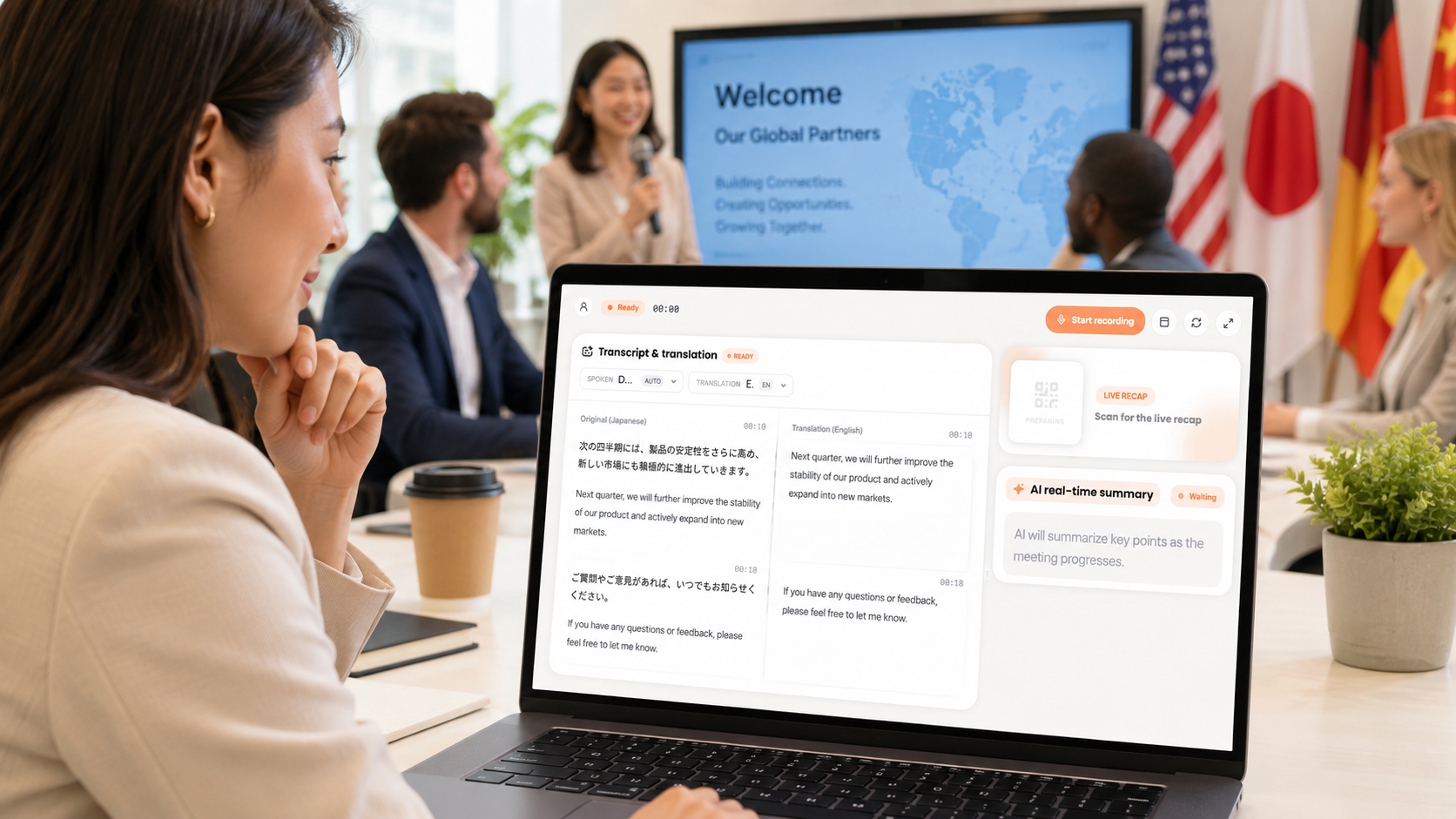
With Intent Live Caption, you start a recording and keep listening. The app transcribes nearby speech one sentence at a time, detects the spoken language automatically, and places the original text beside the translation. You do not have to wait for a meeting, class, or talk to end before you understand it.
Intent supports real-time transcription in 66 languages. When the session is over, the full transcript remains available for review, search, and export. Something you would normally hear once becomes a bilingual record you can return to.
Image alt: A person following original Japanese speech and real-time English translation side by side with Intent Live Caption during an international conversation.
What are live bilingual captions?
Live bilingual captions are a real-time combination of speech-to-text and translation. As a person speaks, the original words appear as text. A translated version appears alongside them in the language you understand best.
The word “live” matters. Ordinary transcription often helps after an event. Live captions help while you are still in the room and can still ask a question, respond to a point, or confirm a detail.
The word “bilingual” matters too. A translated sentence gives you the meaning, but the original text gives you names, terminology, and exact wording. Seeing both helps you decide when the translation is enough and when you should look more closely at the source.
This is useful even when you know the language reasonably well. Many people can follow the main idea of an international meeting but miss a date, product name, or assignment when the discussion becomes fast.
How does Intent Live Caption work?
The experience begins when you open the recording in Intent Live Caption.
The app listens to the nearby audio, identifies the language being spoken, and turns each sentence into original-language text. It then displays a translation in your language beside the original. Both versions move with the conversation, so you can listen and read at the same time.
Automatic language detection is especially helpful in multilingual settings. A global meeting may begin in English, move into Japanese for a local detail, and return to English for the final decision. At a trade show, each person you meet may speak a different language.
You do not need to stop and change the source language every time. Intent detects the spoken language as the session continues.
Live Caption currently supports real-time transcription in 66 languages. Support for many languages does not mean every environment will produce identical results. Audio quality, background noise, accents, overlapping speech, and technical vocabulary can all affect what appears on screen.
Why show the original and translation side by side?
The original and translated captions do different jobs.
The translation helps you understand the meaning quickly. The original helps you verify how a name was said, how a technical term is spelled, and whether a number or deadline needs another check.
Imagine an international product meeting. One teammate explains an issue in Japanese, then another summarizes the next step in English. The translation helps you stay with the discussion. The original text helps you recognize the project name and the precise language used for the assignment.
Side-by-side captions also preserve a connection to the speaker. You still hear the real voice, rhythm, hesitation, and emphasis — the same principle behind translating voice messages without losing the sender's voice. The translated text does not pretend that language has no personality. It gives you another way to understand without asking the speaker to leave their language behind.
When a translation seems unusual, the original is there for comparison. You may recognize a borrowed term, a proper noun, or a familiar phrase that explains why the translated sentence reads differently.
How are live captions different from interpretation?
Live bilingual captions and professional interpretation are not interchangeable.
Professional interpreters can account for context, diplomacy, humor, technical meaning, and cultural nuance in ways an automatic tool may not. High-stakes legal proceedings, medical conversations, formal negotiations, and major public events may require trained language professionals.
Live captions are better understood as immediate reading support. They help you follow everyday meetings, classes, talks, introductions, and videos. They also leave behind a searchable transcript.
For important decisions, use captions to understand the conversation and then confirm the final wording with the people involved. The tool helps you stay present; it does not remove your responsibility to check facts that carry risk.
Live captions vs. post-session transcripts
Live captions answer, “What are they saying now?” A post-session transcript answers, “What did they say earlier?”
During a session, captions can help you:
- Follow an unfamiliar accent;
- Catch a number or name you did not hear clearly;
- Reconnect after a long sentence;
- Notice when the speaker changes languages;
- Ask a question before the topic moves on.
After the session, a saved transcript can help you:
- Search for a person, project, or concept;
- Review a difficult passage;
- Prepare meeting notes or study notes;
- Export the text for a separate document;
- Confirm the context around a decision.
Intent connects these two moments. You can understand the conversation as it happens, then find the same information again when memory is no longer enough.
Where can you use live bilingual captions?
International and cross-border meetings
Global teams often share one working language, but that does not mean everyone processes it at the same speed. Captions can help with different accents, fast discussion, and temporary language changes.
They are particularly useful during project updates, remote standups, research interviews, partner calls, and training sessions where details matter — the same shift toward real-time translation in cross-border communication that is reshaping how global teams work.
In-person classes and lectures
In a class taught in another language, you may understand the main point but miss the spelling of a term or the details of an assignment. Live captions let you see the original wording and the translation while you listen.
After class, the transcript becomes a searchable bilingual study record. It should support the instructor's official materials, not replace them.
Trade shows and international events
Trade show floors are noisy. Conversations are short, and they often contain company names, product terms, prices, and next steps — much of it also printed on booth signage and spec sheets, where an AI image translator for technical drawings and product labels covers what speech cannot.
Live captions can help you understand the person in front of you and remember the conversation later. Always ask before recording, especially when commercial information may be discussed.
Talks, workshops, and community events
Guest speakers may use a language that part of the audience does not know well. A personal caption view can make the talk easier to follow without changing the speaker's delivery.
Foreign-language videos
Some useful interviews, lessons, and talks have no translation or only original-language subtitles. Intent can listen to the video audio, display bilingual captions, and keep the transcript for later review.
Follow copyright rules and confirm exact wording before quoting the source.
How to use live captions well
Before a session, place your device where it can hear the main audio clearly. Reduce background noise when possible, and make sure the people involved know that recording or transcription will take place.
During the session, keep listening to the speaker. Use the captions as a second path, not as a reason to stop paying attention to tone and context. When you see a deadline, amount, or important promise, confirm it out loud.
After the session, search the transcript for the parts that matter. Do not assume every line is perfect. Review names, numbers, technical terms, and negative statements before using them in formal notes.
This before-during-after habit makes the transcript more useful and keeps the conversation human.
What affects live caption accuracy?
Speech recognition works best when the audio is clear and one person speaks at a time.
Common challenges include:
- Several people speaking at once;
- Music or crowd noise near the microphone;
- A distant or distorted speaker;
- Uncommon names and internal abbreviations;
- Highly specialized terminology;
- A weak connection or interrupted audio source.
If a term is central to the conversation, ask the speaker to repeat or spell it. If a number creates a financial, legal, or project commitment, repeat it back for confirmation.
Live captions reduce uncertainty, but a quick human check is still the safest response to important information.
Privacy and consent matter
Meetings, classes, and face-to-face conversations may include personal or confidential information.
Tell people before you record. Follow the rules of your workplace, school, event, and location. If the content is sensitive, check whether transcription is allowed before opening the feature.
Intent's current privacy policy explains how translation, transcription, and related features process content, and what to know before you send in international chat apps covers the wider question. Review that policy and your organization's requirements before using Live Caption for confidential work.
Clear consent is part of a good cross-language conversation. Understanding someone should not come at the cost of surprising them.
FAQ
Does Intent Live Caption support more than English?
Yes. Intent supports real-time transcription in 66 languages. The feature is designed for international and multilingual situations, not only English meetings.
Do I need to select the spoken language manually?
No. Intent detects the language being spoken automatically, so a conversation can move between languages without repeated manual changes.
Can I see the original and translation together?
Yes. The original text and the translation in your language appear side by side while the speech continues.
Is the transcript available after the session?
Yes. Intent keeps the complete transcript for later review, search, and export.
Can live captions replace a professional interpreter?
Not in every situation. Everyday meetings, classes, talks, and videos may be good fits. High-stakes legal, medical, or formal negotiations may require a qualified interpreter.
Should I tell people before recording?
Yes. Inform everyone involved and follow the consent and recording rules that apply where you are.
Understand now, return later
Live bilingual captions do more than produce a block of text after a conversation.
They help while the words are still being spoken. You can listen to the real voice, read the original, understand the translation, and keep the full session for later.
That can turn a difficult international meeting into a conversation you can join, a fast lecture into notes you can study, or a foreign-language video into something you can finally follow without pausing every few seconds.
Related reading